<?xml version="1.0" encoding="utf-8"?><feed xmlns="http://www.w3.org/2005/Atom" ><generator uri="https://jekyllrb.com/" version="3.9.5">Jekyll</generator><link href="https://cpp4arduino.com/feed.xml" rel="self" type="application/atom+xml" /><link href="https://cpp4arduino.com/" rel="alternate" type="text/html" /><updated>2024-02-20T08:28:10+01:00</updated><id>https://cpp4arduino.com/feed.xml</id><title type="html">C++ for Arduino</title><subtitle>A blog for Arduino developers who want to write good C++ code. Neither a beginner site nor an expert site, it's something in between.</subtitle><author><name>{&quot;twitter&quot;=&gt;&quot;BenoitBlanchon&quot;}</name></author><entry><title type="html">How to format strings without the String class</title><link href="https://cpp4arduino.com/2020/02/07/how-to-format-strings-without-the-string-class.html" rel="alternate" type="text/html" title="How to format strings without the String class" /><published>2020-02-07T00:00:00+01:00</published><updated>2020-02-07T00:00:00+01:00</updated><id>https://cpp4arduino.com/2020/02/07/how-to-format-strings-without-the-string-class</id><content type="html" xml:base="https://cpp4arduino.com/2020/02/07/how-to-format-strings-without-the-string-class.html"><![CDATA[<iframe width="560" height="315" src="https://www.youtube.com/embed/en9s4o9wB5g" frameborder="0" allow="accelerometer; autoplay; encrypted-media; gyroscope; picture-in-picture" allowfullscreen=""></iframe>

<p>I often recommend avoiding the <code class="language-plaintext highlighter-rouge">String</code> class in Arduino programs, but I never took the time to show you the alternatives. In this article, I’ll teach you how to format complex strings without the <code class="language-plaintext highlighter-rouge">String</code> class. What do I mean by that? You know, this kind of things:</p>

<div class="language-c++ highlighter-rouge"><div class="highlight"><pre class="highlight"><code><span class="c1">// https://api.github.com/bblanchon/repos?page=2</span>
<span class="n">String</span> <span class="n">url</span> <span class="o">=</span> <span class="n">String</span><span class="p">(</span><span class="s">"https://api.github.com/"</span><span class="p">)</span> <span class="o">+</span> <span class="n">user</span> <span class="o">+</span> <span class="s">"/repos?page="</span> <span class="o">+</span> <span class="n">page</span><span class="p">;</span>
</code></pre></div></div>

<h2 id="whats-the-problem-with-the-string-class">What’s the problem with the <code class="language-plaintext highlighter-rouge">String</code> class?</h2>

<p>But why should we avoid the <code class="language-plaintext highlighter-rouge">String</code> class? As I explained in <a href="/2018/11/06/what-is-heap-fragmentation.html">a previous article</a>, heap fragmentation is a major concern in embedded programming. To prevent fragmentation, you should always allocate blocks of the same size, or better, don’t use the heap at all.</p>

<p>The problem with the <code class="language-plaintext highlighter-rouge">String</code> class is that it forces you to use the heap and allocates blocks of variables size. Use several <code class="language-plaintext highlighter-rouge">String</code> instances in your program, and soon, the RAM is full of holes like Swiss cheese.</p>

<h2 id="back-to-basics">Back to basics</h2>

<p>So how can we get rid of the <code class="language-plaintext highlighter-rouge">String</code> class? We’ll take some distance with C++ for a moment and get back to plain old C. As you probably know, we can use any C feature in C++, and that what we’re going to do in this article: we’ll formats strings as C programmers do.</p>

<p>First, let’s look at how the C language models strings. In C, a string is a contiguous sequence of characters ended by a 0. We call this last byte the “terminator” because it marks the end of the sequence. The picture below shows how the bytes of the string “hello” are laid out in RAM.</p>

<p><img src="/assets/images/2020/02/c-string-in-memory.svg" alt="A C string in memory" /></p>

<p>Keep this picture in mind because every time you write a string literal, this is exactly what goes in memory, whether you use the <code class="language-plaintext highlighter-rouge">String</code> class or not. Indeed, the <code class="language-plaintext highlighter-rouge">String</code> class is just a fancy wrapper on top of a C string. Everything you can do with the <code class="language-plaintext highlighter-rouge">String</code> class, you can also do with a C string, even if it’s usually more complicated.</p>

<h2 id="string-formatting-in-c">String formatting in C</h2>

<p>If you’ve done any C programming, you probably used the <code class="language-plaintext highlighter-rouge">printf()</code> function, which writes things to the terminal. <code class="language-plaintext highlighter-rouge">printf()</code> is the equivalent of Arduino’s <code class="language-plaintext highlighter-rouge">Serial.print()</code>.</p>

<p>The major difference between <code class="language-plaintext highlighter-rouge">printf()</code> and <code class="language-plaintext highlighter-rouge">Serial.print()</code> is that, before passing the things you want to write, you must tell <code class="language-plaintext highlighter-rouge">printf()</code> the type of those things. For example, suppose you have a float that contains the weight of something, and you want to display it. On Arduino you would write:</p>

<div class="language-c++ highlighter-rouge"><div class="highlight"><pre class="highlight"><code><span class="n">Serial</span><span class="p">.</span><span class="n">print</span><span class="p">(</span><span class="n">weight</span><span class="p">);</span>
</code></pre></div></div>

<p>In C, you would write:</p>

<div class="language-c++ highlighter-rouge"><div class="highlight"><pre class="highlight"><code><span class="n">printf</span><span class="p">(</span><span class="s">"%f"</span><span class="p">,</span> <span class="n">weight</span><span class="p">);</span>
</code></pre></div></div>

<p>As you see, we need to pass an extra argument that specifies the type. In this case, <code class="language-plaintext highlighter-rouge">%f</code> means that we are passing a floating-point value. We’ll see more examples in a moment, but first, let me explain how this relates to strings.</p>

<h2 id="storing-the-result">Storing the result</h2>

<p>As you know, <code class="language-plaintext highlighter-rouge">Serial.print()</code> sends information to the serial port but doesn’t store it. Similarly, <code class="language-plaintext highlighter-rouge">printf()</code> sends information to the terminal but doesn’t store anything. To save the result of in a string, we need to use another function called <code class="language-plaintext highlighter-rouge">sprintf()</code>. This function takes the destination string as an additional argument. The destination comes first in the argument list, before the format and before the values you want to write.</p>

<p>If we go back to our previous example, to store the string on Arduino you would probably write:</p>

<div class="language-c++ highlighter-rouge"><div class="highlight"><pre class="highlight"><code><span class="n">String</span> <span class="n">s</span> <span class="o">=</span> <span class="n">weight</span><span class="p">;</span>
</code></pre></div></div>

<p>In C, you would write;</p>

<div class="language-c++ highlighter-rouge"><div class="highlight"><pre class="highlight"><code><span class="kt">char</span> <span class="n">s</span><span class="p">[</span><span class="mi">16</span><span class="p">];</span>
<span class="n">sprintf</span><span class="p">(</span><span class="n">s</span><span class="p">,</span> <span class="s">"%f"</span><span class="p">,</span> <span class="n">weight</span><span class="p">);</span>
</code></pre></div></div>

<p>As you can see, the C version is a little more verbose. In addition to calling <code class="language-plaintext highlighter-rouge">sprintf()</code>, we need to allocate the sequence of characters. In this case, we used a simple char array large enough to store the string with the terminator.</p>

<p>Now you can see a major difference between the two approaches: the Arduino version uses a <code class="language-plaintext highlighter-rouge">String</code>, which allocates the right number of bytes in the heap, whereas the C version allocates a fixed number of bytes in the stack.</p>

<p>You probably worry about the overhead caused by the unused bytes in the array. You’re right, there can be up to 14 unused bytes in the array, but this is nothing compared to what you loose from the heap management data and from the heap fragmentation. Moreover, this is a local variable, so we’ll reclaim the memory as soon as it gets out of scope.</p>

<h2 id="buffer-overflows">Buffer overflows</h2>

<p>No, I’m not worried about the memory overhead, but I’m seriously concerned about buffer overflows. What happens if you’ve been too cheap when allocating the string and the actual content is longer than expected. I’ll tell you what happens: bad things! <code class="language-plaintext highlighter-rouge">sprintf()</code> is not aware of the capacity of the destination buffer, so it continues to write as if nothing happened.</p>

<p>In practice, it overrides the bytes that follow the buffer in RAM. For example, if there is an integer variable stored just after the buffer, the value of this variable will change. This is what we call a <a href="https://owasp.org/www-community/vulnerabilities/Buffer_Overflow">buffer overflow</a>, and it’s a real security issue. Not only a buffer overflow may crash your program, but it also allows hackers to modify the memory of your process and change its behavior.</p>

<p>To protect your program against buffer overflows, you must use another variant of <code class="language-plaintext highlighter-rouge">printf()</code>, called <code class="language-plaintext highlighter-rouge">snprintf()</code>, which supports an additional parameter to specify the capacity of the destination buffer. Here it is in action:</p>

<div class="language-c++ highlighter-rouge"><div class="highlight"><pre class="highlight"><code><span class="kt">char</span> <span class="n">s</span><span class="p">[</span><span class="mi">16</span><span class="p">];</span>
<span class="n">snprintf</span><span class="p">(</span><span class="n">s</span><span class="p">,</span> <span class="mi">16</span><span class="p">,</span> <span class="s">"%f"</span><span class="p">,</span> <span class="n">weight</span><span class="p">);</span>
</code></pre></div></div>

<p>As you can see, we pass the size of the buffer as the second parameter of <code class="language-plaintext highlighter-rouge">snprintf()</code>; I used the literal <code class="language-plaintext highlighter-rouge">16</code>, but we could use <code class="language-plaintext highlighter-rouge">sizeof(s)</code> instead.</p>

<h2 id="placeholders">Placeholders</h2>

<p>We saw how we could use <code class="language-plaintext highlighter-rouge">snprintf()</code> to convert a float to a string, is that all we can do? Of course not, that was just an introduction; <code class="language-plaintext highlighter-rouge">snprintf()</code> is very flexible as we’ll see now.</p>

<p>First, let’s see how we can put this float in a sentence. Imagine we want to generate the string <code class="language-plaintext highlighter-rouge">"weight = {weight} kg"</code>. With the <code class="language-plaintext highlighter-rouge">String</code> class, you would do something like:</p>

<div class="language-c++ highlighter-rouge"><div class="highlight"><pre class="highlight"><code><span class="n">String</span> <span class="n">s</span> <span class="o">=</span> <span class="n">String</span><span class="p">(</span><span class="s">"weight = "</span><span class="p">)</span> <span class="o">+</span> <span class="n">weight</span> <span class="o">+</span> <span class="n">String</span><span class="p">(</span><span class="s">" kg"</span><span class="p">)</span>
</code></pre></div></div>

<p>From the programmer’s point of view, this line of code is OK: it does the job and is fairly readable. However, from the processor standpoint, this line of code is horrible: it requires 4 allocations in the heap and possibly several memory duplications. That’s way too much work for such a simple task.</p>

<p>Now, let’s see how we would write the same line with <code class="language-plaintext highlighter-rouge">snprintf()</code>:</p>

<div class="language-c++ highlighter-rouge"><div class="highlight"><pre class="highlight"><code><span class="kt">char</span> <span class="n">s</span><span class="p">[</span><span class="mi">32</span><span class="p">];</span>
<span class="n">snprintf</span><span class="p">(</span><span class="n">s</span><span class="p">,</span> <span class="k">sizeof</span><span class="p">(</span><span class="n">s</span><span class="p">),</span> <span class="s">"weight = %f kg"</span><span class="p">,</span> <span class="n">weight</span><span class="p">);</span>
</code></pre></div></div>

<p>The syntax is a bit more clunky, but as soon as you get used to it (and every C programmer got used to it before you), it reads fairly well too. As you can see, the <code class="language-plaintext highlighter-rouge">%f</code> that was our complete format specification is now a placeholder for the value.</p>

<p>If you want to format your number in a certain way, you can say so in the format string. For example, if you want four digits after the decimal point, you can write:</p>

<div class="language-c++ highlighter-rouge"><div class="highlight"><pre class="highlight"><code><span class="n">snprintf</span><span class="p">(</span><span class="n">s</span><span class="p">,</span> <span class="k">sizeof</span><span class="p">(</span><span class="n">s</span><span class="p">),</span> <span class="s">"weight = %.4f kg"</span><span class="p">,</span> <span class="n">weight</span><span class="p">);</span>
</code></pre></div></div>

<p>As a reminder, this is how you would do with the <code class="language-plaintext highlighter-rouge">String</code> class:</p>

<div class="language-c++ highlighter-rouge"><div class="highlight"><pre class="highlight"><code><span class="n">String</span> <span class="n">s</span> <span class="o">=</span> <span class="n">String</span><span class="p">(</span><span class="s">"weight = "</span><span class="p">)</span> <span class="o">+</span> <span class="n">String</span><span class="p">(</span><span class="n">weight</span><span class="p">,</span> <span class="mi">4</span><span class="p">)</span> <span class="o">+</span> <span class="n">String</span><span class="p">(</span><span class="s">" kg"</span><span class="p">);</span>
</code></pre></div></div>

<p>Which one is the most readable now?</p>

<h2 id="other-types">Other types</h2>

<p>I think you get the idea; let’s talk about other value types. Remember that you must adapt the format specifier to the type of the value. <code class="language-plaintext highlighter-rouge">%f</code> was only for floats; for other types, you must use other specifiers like <code class="language-plaintext highlighter-rouge">%i</code>, <code class="language-plaintext highlighter-rouge">%h</code>, or <code class="language-plaintext highlighter-rouge">%s</code>. The table below summarizes the most common format specifiers:</p>

<table>
  <thead>
    <tr>
      <th style="text-align: left">Format</th>
      <th style="text-align: left">Type</th>
    </tr>
  </thead>
  <tbody>
    <tr>
      <td style="text-align: left">%c</td>
      <td style="text-align: left">char</td>
    </tr>
    <tr>
      <td style="text-align: left">%i</td>
      <td style="text-align: left">int</td>
    </tr>
    <tr>
      <td style="text-align: left">%u</td>
      <td style="text-align: left">unsigned</td>
    </tr>
    <tr>
      <td style="text-align: left">%f</td>
      <td style="text-align: left">float<sup>*</sup></td>
    </tr>
    <tr>
      <td style="text-align: left">%s</td>
      <td style="text-align: left">string</td>
    </tr>
  </tbody>
</table>

<p><small>*: not supported by the Arduino Core for AVR</small></p>

<p>You can find the complete list on <a href="https://en.wikipedia.org/wiki/Printf_format_string">Wikipedia</a>. There is also a shorter version in Appendix B of the <a href="//www.amazon.com/dp/0131103628?tag=bblanchon0b-20">K&amp;R book</a>, which I recommend.</p>

<h2 id="mixing-types">Mixing types</h2>

<p>Of course, we can use several placeholders when we have several values. Suppose we want to create the string <code class="language-plaintext highlighter-rouge">"{name} is {age} years old"</code> from the two variables <code class="language-plaintext highlighter-rouge">name</code> (a string) and <code class="language-plaintext highlighter-rouge">age</code> (an integer). To do that, we call <code class="language-plaintext highlighter-rouge">snprintf()</code> like this:</p>

<div class="language-c++ highlighter-rouge"><div class="highlight"><pre class="highlight"><code><span class="n">snprintf</span><span class="p">(</span><span class="n">s</span><span class="p">,</span> <span class="k">sizeof</span><span class="p">(</span><span class="n">s</span><span class="p">),</span> <span class="s">"%s is %i years old"</span><span class="p">,</span> <span class="n">name</span><span class="p">,</span> <span class="n">age</span><span class="p">);</span>
</code></pre></div></div>

<p>As you see, we use the <code class="language-plaintext highlighter-rouge">%s</code> format for the string and <code class="language-plaintext highlighter-rouge">%i</code> for the integer. In this case, I assumed the string was a <code class="language-plaintext highlighter-rouge">const char*</code>. Indeed, <code class="language-plaintext highlighter-rouge">snprintf()</code> is a C function, so it knows nothing about C++ objects, it only supports C strings. If instead, we have a <code class="language-plaintext highlighter-rouge">String</code> object, we would have to get the pointer to the internal C string, like that:</p>

<div class="language-c++ highlighter-rouge"><div class="highlight"><pre class="highlight"><code><span class="n">snprintf</span><span class="p">(</span><span class="n">s</span><span class="p">,</span> <span class="k">sizeof</span><span class="p">(</span><span class="n">s</span><span class="p">),</span> <span class="s">"%s is %i years old"</span><span class="p">,</span> <span class="n">name</span><span class="p">.</span><span class="n">c_str</span><span class="p">(),</span> <span class="n">age</span><span class="p">);</span>
</code></pre></div></div>

<p>Also, notice the order of the arguments: the values appear in the same order as the placeholders. This is a constraint imposed by printf functions: the arguments must be in the same order as the placeholders in the format string.</p>

<h2 id="format-string-errors">Format string errors</h2>

<p>What happens if you pass the arguments in the wrong order? For <code class="language-plaintext highlighter-rouge">%i</code>, it’s not so bad, <code class="language-plaintext highlighter-rouge">snprintf()</code> would treat <code class="language-plaintext highlighter-rouge">name</code> as an integer instead of a string. In practice, it would print the address of the string in decimal. Things get way worse for the <code class="language-plaintext highlighter-rouge">%s</code> because <code class="language-plaintext highlighter-rouge">snprintf()</code> would treat the integer as a string: it would look at the bytes at the address specified in the integer and print them until it finds the terminator. In practice, this would print garbage in the destination buffer.</p>

<p>Here too, we have a potential security issue. If there is a mismatch between the format specifier and the types of the arguments, the program may disclose information that an attacker could exploit. For example, it could display the value of a pointer value, or even reveal the complete content of the RAM.</p>

<p>Fortunately, the compiler is your friend: it issues a warning when it detects a mismatch in a printf-like function. That’s yet another reason why you should never ignore warnings.</p>

<p>Because this verification is done by the compiler, it can only work if the format string is available at compile-time. In other words, it only works if you pass a constant as the format string. Remember this: Never use a variable as the format string, always use a constant.</p>

<p>In particular, never <strong>ever</strong> use a string that comes from user input as the format string because it would be an easy target for the aspiring hacker. When I say “a user input,” I mean anything that comes from the outside of the code, including configuration files and HTTP requests or responses. Ignoring this commandment would open the door to a <a href="https://owasp.org/www-community/attacks/Format_string_attack">format string attack</a>.</p>

<h2 id="the-holy-grail">The Holy Grail</h2>

<p>Before we say goodbye, I’ll like to present my all-time favorite function of the whole Arduino ecosystem. It’s <code class="language-plaintext highlighter-rouge">snprintf_P()</code>, but I call it “the holy grail” because it’s a hidden treasure that does everything one would want. It is identical to <code class="language-plaintext highlighter-rouge">snprintf()</code> except that it reads the format string from the Flash memory, and therefore reduces the RAM consumption. See it in action here:</p>

<div class="language-c++ highlighter-rouge"><div class="highlight"><pre class="highlight"><code><span class="n">snprintf_P</span><span class="p">(</span><span class="n">s</span><span class="p">,</span> <span class="k">sizeof</span><span class="p">(</span><span class="n">s</span><span class="p">),</span> <span class="n">PSTR</span><span class="p">(</span><span class="s">"%s is %i years old"</span><span class="p">),</span> <span class="n">name</span><span class="p">,</span> <span class="n">age</span><span class="p">);</span>
</code></pre></div></div>

<p>Note that I used the <code class="language-plaintext highlighter-rouge">PSTR()</code> macro instead of <code class="language-plaintext highlighter-rouge">F()</code> because <code class="language-plaintext highlighter-rouge">snprintf_P()</code> expects a regular char pointer and not a <code class="language-plaintext highlighter-rouge">const __FlashStringHelper*</code>.</p>

<h2 id="conclusion">Conclusion</h2>

<p>I’ll conclude this article with my usual advice: stop using the <code class="language-plaintext highlighter-rouge">String</code> class.</p>

<p>Start today. Replace instances one after the other. Soon your program will become more reliable because it won’t rely on the status of the heap to run correctly.</p>

<p>Getting rid of the <code class="language-plaintext highlighter-rouge">String</code> class is a step forward in making your code portable. By avoiding Arduino specific classes and sticking with standard functions, you allow your code to be compiled for other platforms. For example, you could decide to run some parts of your program on your development machine for testing.</p>

<p>And for the very few situations where you must use a <code class="language-plaintext highlighter-rouge">String</code>, for example, if a library forces you to use this class (and there are quite a few), use the <a href="/2018/11/21/eight-tips-to-use-the-string-class-efficiently.html">8 tips I showed in my previous article</a>.</p>]]></content><author><name>{&quot;twitter&quot;=&gt;&quot;BenoitBlanchon&quot;}</name></author><summary type="html"><![CDATA[I often recommend avoiding the `String` class in Arduino programs, but I never took the time to show you the alternatives. In this article, I'll teach you how to format complex strings without the `String` class.]]></summary><media:thumbnail xmlns:media="http://search.yahoo.com/mrss/" url="https://cpp4arduino.com/assets/images/2020/02/how-to-format-strings-without-the-string-class.jpg" /><media:content medium="image" url="https://cpp4arduino.com/assets/images/2020/02/how-to-format-strings-without-the-string-class.jpg" xmlns:media="http://search.yahoo.com/mrss/" /></entry><entry><title type="html">8 tips to use the String class efficiently</title><link href="https://cpp4arduino.com/2018/11/21/eight-tips-to-use-the-string-class-efficiently.html" rel="alternate" type="text/html" title="8 tips to use the String class efficiently" /><published>2018-11-21T00:00:00+01:00</published><updated>2018-11-21T00:00:00+01:00</updated><id>https://cpp4arduino.com/2018/11/21/eight-tips-to-use-the-string-class-efficiently</id><content type="html" xml:base="https://cpp4arduino.com/2018/11/21/eight-tips-to-use-the-string-class-efficiently.html"><![CDATA[<p>In <a href="/2018/11/06/what-is-heap-fragmentation.html">a previous article</a>, we saw what heap fragmentation is and why it’s essential to reduce it.</p>

<p>In most Arduino programs, the principal source of fragmentation is the <code class="language-plaintext highlighter-rouge">String</code> class. Because it uses the heap behind the scenes, you don’t realize that allocation happens.</p>

<p>No, this article is not another rant about the <code class="language-plaintext highlighter-rouge">String</code> class; on the contrary, we’ll see how we can improve our programs while keeping the <code class="language-plaintext highlighter-rouge">String</code> class.</p>

<p><img src="/assets/images/2018/11/fixing-a-hole-on-a-brick-wall.svg" alt="A person applies plaster on a brick wall" /></p>

<h2 id="why-bother">Why bother?</h2>

<p>At first, I wanted to write an article to explain why the <code class="language-plaintext highlighter-rouge">String</code> class is terrible, and how easy it is to avoid it. However, I realized that advising you to rewrite a huge part of your code is not very pleasant nor helpful.</p>

<p>Indeed, the <code class="language-plaintext highlighter-rouge">String</code> class has some design flaws, but it’s not all bad. First, it provides an intuitive syntax that is familiar to Java and C# programmers, so it certainly helps beginners. Second, the <code class="language-plaintext highlighter-rouge">String</code> class provides a convenient means to bring a Flash string into the RAM temporarily, as we’ll see.</p>

<p>Avoiding heap allocation is not always possible. Many Arduino cores (most notably the ones for ESP8266 and ESP32) put a very low limit on the stack size, so it’s not possible to put large strings there. In this case, using the <code class="language-plaintext highlighter-rouge">String</code> class makes perfect sense.</p>

<p>Finally, some libraries (for example ESP8266WebServer) force us to use the <code class="language-plaintext highlighter-rouge">String</code> class. Yes, it drives me crazy too, but I still prefer reusing the library than writing my own.</p>

<p>For all these reasons, we need ways to make efficient programs while still using the <code class="language-plaintext highlighter-rouge">String</code> class.</p>

<h2 id="what-i-mean-by-efficient">What I mean by “efficient”</h2>

<p>Before showing you how to improve the efficiency of the program, I need to clarify what I mean. In this article, “being efficient” means:</p>

<ol>
  <li>using as little RAM as possible</li>
  <li>using as few CPU cycles as possible</li>
  <li>reducing heap fragmentation</li>
</ol>

<p>To reduce the RAM usage, we ensure that only one copy of a string is present at any given time.</p>

<p>To use fewer CPU cycles, we avoid moving bytes from one place to another.</p>

<p>To reduce the heap fragmentation, we must reduce the number of allocation and use blocks of constant size.</p>

<h2 id="code-instrumentation">Code instrumentation</h2>

<p>To benchmark the efficiency of the tips presented here, I modified the original <code class="language-plaintext highlighter-rouge">String</code> class to make it logs each allocation and each duplication. For example, it logs the calls to <code class="language-plaintext highlighter-rouge">malloc()</code>, <code class="language-plaintext highlighter-rouge">free()</code>, and <code class="language-plaintext highlighter-rouge">strcpy()</code>. It also watches the calls to <code class="language-plaintext highlighter-rouge">realloc()</code> which are very important because this function both allocates and moves bytes.</p>

<p>As usual, you’ll find the <a href="https://github.com/bblanchon/cpp4arduino/tree/master/EfficientString">code samples on GitHub</a>. In this article, each code snippet starts with a number indicating to the corresponding function in the sample project.</p>

<h2 id="tip-1-initialize-from-flash-string">Tip 1: Initialize from Flash string</h2>

<p>When you define a string literal, the compiler adds it to the “global” area<sup id="fnref:1" role="doc-noteref"><a href="#fn:1" class="footnote" rel="footnote">1</a></sup>, meaning that all the characters are always in the RAM whether you’re using them or not.</p>

<p>Here is an example:</p>

<div class="language-c++ highlighter-rouge"><div class="highlight"><pre class="highlight"><code><span class="c1">// #1</span>
<span class="kt">void</span> <span class="nf">sayHello</span><span class="p">()</span> <span class="p">{</span>
   <span class="n">String</span> <span class="n">s</span> <span class="o">=</span> <span class="s">"hello"</span><span class="p">;</span>
   <span class="n">send</span><span class="p">(</span><span class="n">s</span><span class="p">);</span>
<span class="p">}</span>
</code></pre></div></div>

<p>The six bytes composing the string “hello” (including the terminator) are present in RAM during the whole execution of the program. When <code class="language-plaintext highlighter-rouge">sayHello()</code> runs, the constructor of <code class="language-plaintext highlighter-rouge">String</code> makes a copy in the heap.</p>

<p>This program is inefficient because we have two copies of the same strings in the RAM. To improve it, we can prevent the compiler from putting the literal in the RAM, and to keep it in the Flash memory. The <code class="language-plaintext highlighter-rouge">PROGMEM</code> attribute allows doing that, but since it’s not very convenient, Arduino provices the <code class="language-plaintext highlighter-rouge">F()</code> macro.</p>

<p>Here is the fixed version:</p>

<div class="language-c++ highlighter-rouge"><div class="highlight"><pre class="highlight"><code><span class="c1">// #2</span>
<span class="kt">void</span> <span class="nf">sayHello</span><span class="p">()</span> <span class="p">{</span>
   <span class="n">String</span> <span class="n">s</span> <span class="o">=</span> <span class="n">F</span><span class="p">(</span><span class="s">"hello"</span><span class="p">);</span>
   <span class="n">send</span><span class="p">(</span><span class="n">s</span><span class="p">);</span>
<span class="p">}</span>
</code></pre></div></div>

<p>Now, the 6 bytes are copied in the RAM only when <code class="language-plaintext highlighter-rouge">sayHello()</code> executes.</p>

<p>Flash strings can significantly improve the efficiency of your program, but they have a few gotchas, as we saw in <a href="/2018/10/23/what-is-string-interning.html">a previous article</a>.</p>

<h2 id="tip-2-use-c_str-instead-of-tochararray">Tip 2: Use <code class="language-plaintext highlighter-rouge">c_str()</code> instead of <code class="language-plaintext highlighter-rouge">toCharArray()</code></h2>

<p>Suppose, you have a <code class="language-plaintext highlighter-rouge">String</code> <code class="language-plaintext highlighter-rouge">s</code> and need to call a function <code class="language-plaintext highlighter-rouge">send()</code> that takes an argument of type <code class="language-plaintext highlighter-rouge">const char*</code>. There are two ways to convert a <code class="language-plaintext highlighter-rouge">String</code> to a <code class="language-plaintext highlighter-rouge">char</code> pointer.</p>

<p>The first is to call <code class="language-plaintext highlighter-rouge">toCharArray()</code> which copies all the characters to an array:</p>

<div class="language-c++ highlighter-rouge"><div class="highlight"><pre class="highlight"><code><span class="c1">// #3</span>
<span class="kt">char</span> <span class="n">tmp</span><span class="p">[</span><span class="mi">32</span><span class="p">]</span>
<span class="n">s</span><span class="p">.</span><span class="n">toCharArray</span><span class="p">(</span><span class="n">tmp</span><span class="p">,</span> <span class="k">sizeof</span><span class="p">(</span><span class="n">tmp</span><span class="p">));</span>
<span class="n">send</span><span class="p">(</span><span class="n">tmp</span><span class="p">);</span>
</code></pre></div></div>

<p>The second way is to call <code class="language-plaintext highlighter-rouge">c_str()</code> which returns a pointer to the internal buffer of the <code class="language-plaintext highlighter-rouge">String</code>:</p>

<div class="language-c++ highlighter-rouge"><div class="highlight"><pre class="highlight"><code><span class="c1">// #4</span>
<span class="n">send</span><span class="p">(</span><span class="n">s</span><span class="p">.</span><span class="n">c_str</span><span class="p">());</span>
</code></pre></div></div>

<p>By calling <code class="language-plaintext highlighter-rouge">c_str()</code> we avoid a costly duplication, but we must be careful with the returned pointer because it remains valid only if the <code class="language-plaintext highlighter-rouge">String</code> is unchanged. Also, be aware that, <code class="language-plaintext highlighter-rouge">c_str()</code> can return <a href="/2018/10/26/why-cpp-programmers-dont-use-null.html"><code class="language-plaintext highlighter-rouge">nullptr</code></a>.<sup id="fnref:2" role="doc-noteref"><a href="#fn:2" class="footnote" rel="footnote">2</a></sup></p>

<h2 id="tip-3-pass-by-reference">Tip 3: Pass by reference</h2>

<p>Compare these two function declarations:</p>

<div class="language-c++ highlighter-rouge"><div class="highlight"><pre class="highlight"><code><span class="c1">// #5</span>
<span class="kt">void</span> <span class="nf">passByValue</span><span class="p">(</span><span class="n">String</span> <span class="n">s</span><span class="p">);</span>

<span class="c1">// #6</span>
<span class="kt">void</span> <span class="nf">passByRef</span><span class="p">(</span><span class="k">const</span> <span class="n">String</span><span class="o">&amp;</span> <span class="n">s</span><span class="p">);</span>
</code></pre></div></div>

<p>We can call both functions with a <code class="language-plaintext highlighter-rouge">String</code> instance, but the first one receives a copy, whereas the second receives a reference to the original.</p>

<p>Passing objects by reference is much more efficient than passing by value; there are very few exceptions to this rule.<sup id="fnref:3" role="doc-noteref"><a href="#fn:3" class="footnote" rel="footnote">3</a></sup></p>

<h2 id="tip-4-if-you-must-pass-by-value-move-the-string">Tip 4: If you must pass by value, move the <code class="language-plaintext highlighter-rouge">String</code></h2>

<p>If you’re stuck with a library that forces you to pass a <code class="language-plaintext highlighter-rouge">String</code> by value, you can avoid the duplication by using the “move semantics” of C++11.</p>

<p>Suppose you constructed a <code class="language-plaintext highlighter-rouge">String</code> <code class="language-plaintext highlighter-rouge">s</code>; the normal way to pass <code class="language-plaintext highlighter-rouge">s</code> to a function is to write:</p>

<div class="language-c++ highlighter-rouge"><div class="highlight"><pre class="highlight"><code><span class="c1">// #5</span>
<span class="n">passByValue</span><span class="p">(</span><span class="n">s</span><span class="p">);</span>
</code></pre></div></div>

<p>However, if you know you’ll not use the <code class="language-plaintext highlighter-rouge">s</code> after the call, you can “move” the object:</p>

<div class="language-c++ highlighter-rouge"><div class="highlight"><pre class="highlight"><code><span class="c1">// #7</span>
<span class="n">passByValue</span><span class="p">(</span><span class="n">move</span><span class="p">(</span><span class="n">s</span><span class="p">));</span>
</code></pre></div></div>

<p><code class="language-plaintext highlighter-rouge">move()</code> replicates the standard <code class="language-plaintext highlighter-rouge">std::move()</code> that Arduino lacks. This function converts <code class="language-plaintext highlighter-rouge">s</code> to a <code class="language-plaintext highlighter-rouge">String&amp;&amp;</code>, allowing to call the “move-constructor” of <code class="language-plaintext highlighter-rouge">String</code>. This constructor rips off the content of <code class="language-plaintext highlighter-rouge">s</code> to create the argument for <code class="language-plaintext highlighter-rouge">passByValue()</code>, so we cannot use <code class="language-plaintext highlighter-rouge">s</code> after that.</p>

<h2 id="tip-5-mutate-a-string-instead-of-creating-temporaries">Tip 5: Mutate a <code class="language-plaintext highlighter-rouge">String</code> instead of creating temporaries</h2>

<p>The <code class="language-plaintext highlighter-rouge">+</code> operator offers a nice syntax for composing <code class="language-plaintext highlighter-rouge">String</code>s. Unfortunately, each call to this operator creates one or more temporary (read “hidden”) instances of <code class="language-plaintext highlighter-rouge">String</code>.</p>

<p>For example, the following line requires six allocations in the heap:</p>

<div class="language-c++ highlighter-rouge"><div class="highlight"><pre class="highlight"><code><span class="c1">// #8</span>
<span class="n">String</span> <span class="n">path</span> <span class="o">=</span> <span class="n">String</span><span class="p">(</span><span class="s">"/api/"</span><span class="p">)</span> <span class="o">+</span> <span class="n">RESOURCE</span> <span class="o">+</span> <span class="s">"?key="</span> <span class="o">+</span> <span class="n">API_KEY</span><span class="p">;</span>
</code></pre></div></div>

<p>To reduce the number of allocations, we need to avoid the <code class="language-plaintext highlighter-rouge">+</code> operator. Instead, we can call the <code class="language-plaintext highlighter-rouge">+=</code> operator which modifies the left-side argument instead of creating a new <code class="language-plaintext highlighter-rouge">String</code>.</p>

<p>By rewriting the line above, we can reduce the number of allocations to four:</p>

<div class="language-c++ highlighter-rouge"><div class="highlight"><pre class="highlight"><code><span class="c1">// #9</span>
<span class="n">String</span> <span class="nf">path</span><span class="p">(</span><span class="s">"/api/"</span><span class="p">);</span>
<span class="n">path</span> <span class="o">+=</span> <span class="n">RESOURCE</span><span class="p">;</span>
<span class="n">path</span> <span class="o">+=</span> <span class="s">"?key="</span><span class="p">;</span>
<span class="n">path</span> <span class="o">+=</span> <span class="n">API_KEY</span><span class="p">;</span>
</code></pre></div></div>

<h2 id="tip-6-call-reserve">Tip 6: Call <code class="language-plaintext highlighter-rouge">reserve()</code></h2>

<p>We can further reduce the number of allocations by calling <code class="language-plaintext highlighter-rouge">reserve()</code> which allocates a buffer of the specified size. If we reserve enough room, the <code class="language-plaintext highlighter-rouge">String</code> doesn’t need to reallocate the buffer when we call <code class="language-plaintext highlighter-rouge">+=</code>.</p>

<p>The following version makes only two allocations:</p>

<div class="language-c++ highlighter-rouge"><div class="highlight"><pre class="highlight"><code><span class="c1">// #10</span>
<span class="n">String</span> <span class="n">path</span><span class="p">;</span>
<span class="n">path</span><span class="p">.</span><span class="n">reserve</span><span class="p">(</span><span class="mi">63</span><span class="p">);</span>
<span class="n">path</span> <span class="o">+=</span> <span class="s">"/api/"</span><span class="p">;</span>
<span class="n">path</span> <span class="o">+=</span> <span class="n">RESOURCE</span><span class="p">;</span>
<span class="n">path</span> <span class="o">+=</span> <span class="s">"?key="</span><span class="p">;</span>
<span class="n">path</span> <span class="o">+=</span> <span class="n">API_KEY</span><span class="p">;</span>
</code></pre></div></div>

<p>Reducing the number of allocations is not the only benefit of <code class="language-plaintext highlighter-rouge">reserve()</code>; it also allow us to control the size of the allocation (64 in the snippet above). That’s excellent because using blocks of constant size reduces the heap fragmentation, as we saw in <a href="/2018/11/06/what-is-heap-fragmentation.html">the previous article</a>.</p>

<h2 id="tip-7-pass-a-null-string-to-the-constructor">Tip 7: Pass a null string to the constructor</h2>

<p>In the snippet above, we used the default constructor of <code class="language-plaintext highlighter-rouge">String</code>, which constructs the instance from an empty string.</p>

<p>In other words:</p>

<div class="language-c++ highlighter-rouge"><div class="highlight"><pre class="highlight"><code><span class="n">String</span> <span class="n">s</span><span class="p">;</span>
</code></pre></div></div>

<p>is identical to</p>

<div class="language-c++ highlighter-rouge"><div class="highlight"><pre class="highlight"><code><span class="n">String</span> <span class="nf">s</span><span class="p">(</span><span class="s">""</span><span class="p">);</span>
</code></pre></div></div>

<p>Unfortunately, this constructor allocates a block in the heap, even if we don’t use this block at all. It allocates only one byte, so it’s not a big deal, but we can avoid it by passing a null to the constructor.</p>

<p>The following version requires only one allocation:</p>

<div class="language-c++ highlighter-rouge"><div class="highlight"><pre class="highlight"><code><span class="c1">// #11</span>
<span class="n">String</span> <span class="nf">path</span><span class="p">((</span><span class="kt">char</span> <span class="o">*</span><span class="p">)</span><span class="mi">0</span><span class="p">);</span>
<span class="n">path</span><span class="p">.</span><span class="n">reserve</span><span class="p">(</span><span class="mi">63</span><span class="p">);</span>
<span class="n">path</span> <span class="o">+=</span> <span class="s">"/api/"</span><span class="p">;</span>
<span class="n">path</span> <span class="o">+=</span> <span class="n">RESOURCE</span><span class="p">;</span>
<span class="n">path</span> <span class="o">+=</span> <span class="s">"?key="</span><span class="p">;</span>
<span class="n">path</span> <span class="o">+=</span> <span class="n">API_KEY</span><span class="p">;</span>
</code></pre></div></div>

<p><strong>NOTE 1</strong>: this tip is irrelevant in Arduino cores that implement SSO (Small String Optimization), such as ESP8266’s and ESP32’s.</p>

<p><strong>NOTE 2</strong>: some Arduino cores (notably Teensy’s) already pass <code class="language-plaintext highlighter-rouge">NULL</code> as the initial value.</p>

<h2 id="tip-8-compose-the-string-at-compile-time">Tip 8: Compose the string at compile time</h2>

<p>The C++ language allows concatenating string literals at compile time; they simply need to be separated by spaces.</p>

<p>For example:</p>

<div class="language-c++ highlighter-rouge"><div class="highlight"><pre class="highlight"><code><span class="k">const</span> <span class="kt">char</span><span class="o">*</span> <span class="n">s</span> <span class="o">=</span> <span class="s">"hello"</span> <span class="s">"world"</span><span class="p">;</span>
</code></pre></div></div>

<p>is identical to:</p>

<div class="language-c++ highlighter-rouge"><div class="highlight"><pre class="highlight"><code><span class="k">const</span> <span class="kt">char</span><span class="o">*</span> <span class="n">s</span> <span class="o">=</span> <span class="s">"helloworld"</span><span class="p">;</span>
</code></pre></div></div>

<p>To leverage this feature with our previous example, we must substitute <code class="language-plaintext highlighter-rouge">RESOURCE</code> and <code class="language-plaintext highlighter-rouge">API_KEY</code> with two string literals. The simplest way is to define two macros that the preprocessor expands before the compiler parses the code.</p>

<div class="language-c++ highlighter-rouge"><div class="highlight"><pre class="highlight"><code><span class="c1">// #12</span>
<span class="cp">#define RESOURCE "outdoor_temp"
#define API_KEY "0123456789"
</span><span class="n">String</span> <span class="n">path</span> <span class="o">=</span> <span class="s">"/api/"</span> <span class="n">RESOURCE</span> <span class="s">"?key="</span> <span class="n">API_KEY</span><span class="p">;</span>
</code></pre></div></div>

<p>By doing all more work at compile time, we reduce the work at runtime.</p>

<p>Of course, this trick only works when you compose a <code class="language-plaintext highlighter-rouge">String</code> with constants, but they don’t have to be string literals. Indeed, there are many tricks that the preprocessor can do, but that’s the topic for another article.</p>

<h2 id="conclusion">Conclusion</h2>

<p>More than ever, I invite you to check out the <a href="https://github.com/bblanchon/cpp4arduino/tree/master/EfficientString">code samples on GitHub</a> because you’ll see the calls to <code class="language-plaintext highlighter-rouge">malloc()</code>, <code class="language-plaintext highlighter-rouge">realloc()</code>, <code class="language-plaintext highlighter-rouge">free()</code> and <code class="language-plaintext highlighter-rouge">strcpy()</code> for each of the examples above. I included the output of the program in the README file, so you don’t have to run the program yourself.</p>

<p>The implementation of <code class="language-plaintext highlighter-rouge">String</code> is part on the Arduino core, so theoretically the tips shown in this article could be irrelevant for some boards. However, because all the cores were forked from the original one for AVR, they are very likely to have the same <code class="language-plaintext highlighter-rouge">String</code> implementation.</p>

<p>I’ll see you soon with another article; meanwhile, check out <a href="https://github.com/bblanchon/cpp4arduino/tree/master/EfficientString">that repository</a> !</p>

<div class="footnotes" role="doc-endnotes">
  <ol>
    <li id="fn:1" role="doc-endnote">
      <p>Depending on the platform, the <code class="language-plaintext highlighter-rouge">.data</code> segment or the <code class="language-plaintext highlighter-rouge">.rodata</code> segment contains the string literals. <a href="#fnref:1" class="reversefootnote" role="doc-backlink">&#8617;</a></p>
    </li>
    <li id="fn:2" role="doc-endnote">
      <p>This behavior differs for <code class="language-plaintext highlighter-rouge">std::string</code> which never returns <code class="language-plaintext highlighter-rouge">nullptr</code> <a href="#fnref:2" class="reversefootnote" role="doc-backlink">&#8617;</a></p>
    </li>
    <li id="fn:3" role="doc-endnote">
      <p>See Item 41 of <a href="//www.amazon.com/dp/1491903996?tag=bblanchon0b-20">Effective Modern C++</a> by Scott Meyers <a href="#fnref:3" class="reversefootnote" role="doc-backlink">&#8617;</a></p>
    </li>
  </ol>
</div>]]></content><author><name>{&quot;twitter&quot;=&gt;&quot;BenoitBlanchon&quot;}</name></author><summary type="html"><![CDATA[In many Arduino programs, the String class is a major cause of inefficiency. We'll see how to improve our code when using this class.]]></summary><media:thumbnail xmlns:media="http://search.yahoo.com/mrss/" url="https://cpp4arduino.com/assets/images/2018/11/fixing-a-hole-on-a-brick-wall.png" /><media:content medium="image" url="https://cpp4arduino.com/assets/images/2018/11/fixing-a-hole-on-a-brick-wall.png" xmlns:media="http://search.yahoo.com/mrss/" /></entry><entry><title type="html">What is Heap Fragmentation?</title><link href="https://cpp4arduino.com/2018/11/06/what-is-heap-fragmentation.html" rel="alternate" type="text/html" title="What is Heap Fragmentation?" /><published>2018-11-06T00:00:00+01:00</published><updated>2018-11-06T00:00:00+01:00</updated><id>https://cpp4arduino.com/2018/11/06/what-is-heap-fragmentation</id><content type="html" xml:base="https://cpp4arduino.com/2018/11/06/what-is-heap-fragmentation.html"><![CDATA[<ul>
  <li><em>There is a lot of free memory, so why allocation fails?</em></li>
  <li><em>My program ran well for hours/days/months, why does it crash now?</em></li>
  <li><em>Why does my program run slower over time?</em></li>
</ul>

<p>Believe or not, the answers to these three questions are the same: you have a
heap fragmentation problem. In this article, we’ll see what it means and how to
fix it.</p>

<h2 id="what-is-the-heap">What is the heap?</h2>

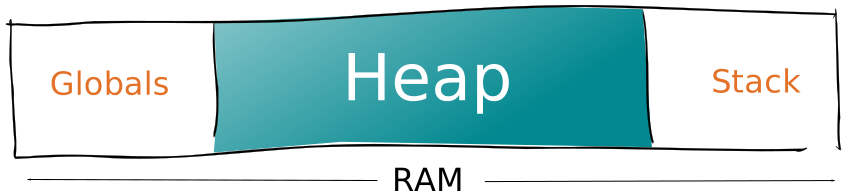
<p>The “heap” is the area of the RAM where the dynamic memory allocation happens.
Every time you call <code class="language-plaintext highlighter-rouge">malloc()</code>, you reserve a block of memory in the heap.</p>

<p><img src="/assets/images/2018/11/the-three-areas-of-the-ram.svg" alt="The three areas of the RAM, with the heap highlighted" /></p>

<p>Similarly, every time you call <code class="language-plaintext highlighter-rouge">new</code>, you reserve a block in the heap. Because
<code class="language-plaintext highlighter-rouge">new</code> calls <code class="language-plaintext highlighter-rouge">malloc()</code> and <code class="language-plaintext highlighter-rouge">delete</code> calls <code class="language-plaintext highlighter-rouge">free()</code>, everything
we’ll see equally applies to <code class="language-plaintext highlighter-rouge">new</code> and <code class="language-plaintext highlighter-rouge">delete</code>.</p>

<p>Very often, your program allocates heap memory without explicitly calling
<code class="language-plaintext highlighter-rouge">malloc()</code>. For example, when you create a <code class="language-plaintext highlighter-rouge">String</code> object, the constructor
allocates some space in the heap to store the characters.</p>

<h2 id="what-is-heap-fragmentation">What is heap fragmentation?</h2>

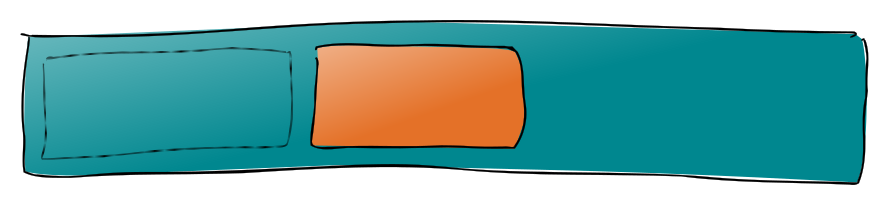
<p>When you call <code class="language-plaintext highlighter-rouge">free()</code> to release a block, you create a hole of unused memory.
After some time, the heap becomes a swiss cheese with many holes.</p>

<p>Here is a simplified view with an imaginary heap of 30 bytes:</p>

<p><img src="/assets/images/2018/11/free-creates-a-hole.svg" alt="free() creates a hole in the heap" /></p>

<p>The holes count as free memory, so there are 20 bytes available. However, we are unable to allocate 20 bytes because there is not a consecutive block of 20 free bytes.</p>

<p>This phenomenon is what we call “heap fragmentation.” It’s an inefficient
utilization of the RAM that prevents a program from using the full capacity
of the microcontroller.</p>

<h2 id="when-does-fragmentation-happen">When does fragmentation happen?</h2>

<p>Suppose you just released a block of memory and therefore created a hole in the
heap.</p>

<p><img src="/assets/images/2018/11/a-hole-in-the-heap.svg" alt="A hole in the heap" /></p>

<p>Is that always a problem? There are three possibilities.</p>

<p>First possibility: you allocate another block of the same size. The new block
takes the place left by the old one. No hole remains.</p>

<p><img src="/assets/images/2018/11/a-block-of-the-same-size-fill-the-hole.svg" alt="A block of the same size fills the hole" /></p>

<p>Second possibility: you allocate a smaller block. The new block fits in the hole
but doesn’t fill it. A small hole remains.</p>

<p><img src="/assets/images/2018/11/a-smaller-block-fits-in-the-hole.svg" alt="A smaller block fits in the hole" /></p>

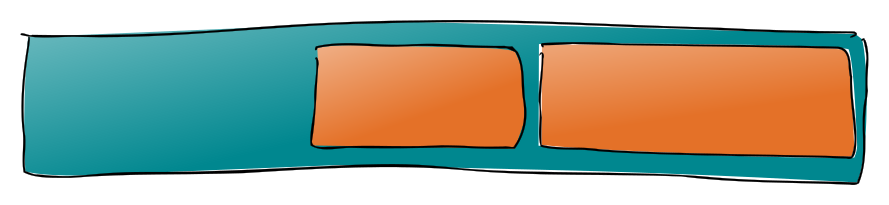
<p>Third possibility: you allocate a larger block. The new block cannot fit in the
hole,  so it’s allocated further in the heap. A big hole remains.</p>

<p><img src="/assets/images/2018/11/a-larger-block-doesnt-fit-in-the-hole.svg" alt="A larger block doesn't fit in the hole" /></p>

<p>As you see, only a program that allocates and releases blocks of different size
increases the heap fragmentation.</p>

<h2 id="an-example">An example</h2>

<p>Now that we get the theory, let’s see a concrete example.</p>

<p>Consider a  <code class="language-plaintext highlighter-rouge">loop()</code> function that downloads the weather forecasts from a web
server. It first saves the response a big <code class="language-plaintext highlighter-rouge">String</code>; then it extracts the date,
the city, the temperature, the humidity, and the weather description in five
<code class="language-plaintext highlighter-rouge">String</code>s of various size.</p>

<div class="language-c++ highlighter-rouge"><div class="highlight"><pre class="highlight"><code><span class="n">String</span> <span class="n">serverResponse</span><span class="p">;</span>
<span class="n">String</span> <span class="n">date</span><span class="p">,</span> <span class="n">city</span><span class="p">,</span> <span class="n">temperature</span><span class="p">,</span> <span class="n">humidity</span><span class="p">,</span> <span class="n">description</span><span class="p">;</span>
<span class="kt">void</span> <span class="nf">loop</span><span class="p">()</span> <span class="p">{</span>
   <span class="n">serverResponse</span> <span class="o">=</span> <span class="n">downloadFromServer</span><span class="p">();</span>
   <span class="n">date</span> <span class="o">=</span> <span class="n">extractDate</span><span class="p">(</span><span class="n">serverResponse</span><span class="p">);</span>
   <span class="n">city</span> <span class="o">=</span> <span class="n">extractCity</span><span class="p">(</span><span class="n">serverResponse</span><span class="p">);</span>
   <span class="n">temperature</span> <span class="o">=</span> <span class="n">extractTemperature</span><span class="p">(</span><span class="n">serverResponse</span><span class="p">);</span>
   <span class="n">description</span> <span class="o">=</span> <span class="n">extractDescription</span><span class="p">(</span><span class="n">serverResponse</span><span class="p">);</span>
<span class="p">}</span>
</code></pre></div></div>

<p>The first iteration of  <code class="language-plaintext highlighter-rouge">loop()</code> is OK: it allocates the <code class="language-plaintext highlighter-rouge">String</code>s in the heap
but doesn’t release them, so no fragmentation happens.</p>

<p>Then, each iteration creates new <code class="language-plaintext highlighter-rouge">String</code>s to replace the old ones. The new
<code class="language-plaintext highlighter-rouge">String</code>s allocate new blocks and the old <code class="language-plaintext highlighter-rouge">String</code>s release the old blocks.</p>

<p>Here is the problem: every time the server returns a different response, the
sizes of the blocks change. As we saw, allocation of varying sizes creates
holes in the heap, which increases the fragmentation.</p>

<h2 id="measuring-the-fragmentation">Measuring the fragmentation</h2>

<p>There are several formal definitions for the fragmentation; in this article,
I’ll use this simple definition:</p>

<p><img src="/assets/images/2018/11/fragmentation-formula.svg" alt="Fragmentation's formula" /></p>

<p>Let’s try some numbers in this formula. Suppose you have 1KB of free RAM.</p>

<ul>
  <li>At 0% (no fragmentation), you can allocate 1KB in one shot.</li>
  <li>At 25%, you can allocate 750B in one shot.</li>
  <li>At 50%, you can only allocate 500B in one shot.</li>
  <li>At 75%, you can only allocate 250B in one shot.</li>
</ul>

<p>A value of 50% or more is considered high and can seriously impede your program,
as we’ll see.</p>

<h2 id="how-fragmentation-evolves-over-time">How fragmentation evolves over time</h2>

<p>Now that we have a formal definition, let’s write a program that will show the
evolution of the fragmentation over time.</p>

<h4 id="computing-the-fragmentation">Computing the fragmentation</h4>

<p>To compute the fragmentation percentage, we apply the formula and multiply by
100:</p>

<div class="language-c++ highlighter-rouge"><div class="highlight"><pre class="highlight"><code><span class="kt">float</span> <span class="nf">getFragmentation</span><span class="p">()</span> <span class="p">{</span>
  <span class="k">return</span> <span class="mi">100</span> <span class="o">-</span> <span class="n">getLargestAvailableBlock</span><span class="p">()</span> <span class="o">*</span> <span class="mf">100.0</span> <span class="o">/</span> <span class="n">getTotalAvailableMemory</span><span class="p">();</span>
<span class="p">}</span>
</code></pre></div></div>

<p>As you can guess, <code class="language-plaintext highlighter-rouge">getLargestAvailableBlock()</code> returns the size of the largest
allocable block, and <code class="language-plaintext highlighter-rouge">getTotalAvailableMemory()</code> returns the total free memory.</p>

<p>Writing these two functions is the trickiest part of this program because they
are dependent on the platform. In
<a href="https://github.com/bblanchon/cpp4arduino/tree/master/HeapFragmentation">the code samples</a>,
I implemented a version for AVR (Arduino UNO et al.) and another for ESP8266.</p>

<h4 id="drilling-holes">Drilling holes</h4>

<p>To produce fragmentation, we saw that we could use a few <code class="language-plaintext highlighter-rouge">String</code>s of various
size and replace them repeatedly.</p>

<p>The easiest way to do that is to have an array of <code class="language-plaintext highlighter-rouge">String</code> and to replace them
with random values:</p>

<div class="language-c++ highlighter-rouge"><div class="highlight"><pre class="highlight"><code><span class="n">String</span> <span class="n">strings</span><span class="p">[</span><span class="n">NUMBER_OF_STRINGS</span><span class="p">];</span>

<span class="k">for</span> <span class="p">(</span><span class="n">String</span> <span class="o">&amp;</span><span class="n">s</span> <span class="o">:</span> <span class="n">strings</span><span class="p">)</span>
   <span class="n">s</span> <span class="o">=</span> <span class="n">generateRandomString</span><span class="p">();</span>
</code></pre></div></div>

<p>As the name suggests, <code class="language-plaintext highlighter-rouge">generateRandomString()</code> returns a <code class="language-plaintext highlighter-rouge">String</code> whose length
varies from one call to the other:</p>

<div class="language-c++ highlighter-rouge"><div class="highlight"><pre class="highlight"><code><span class="n">String</span> <span class="nf">generateRandomString</span><span class="p">()</span> <span class="p">{</span>
  <span class="n">String</span> <span class="n">result</span><span class="p">;</span>
  <span class="kt">int</span> <span class="n">len</span> <span class="o">=</span> <span class="n">random</span><span class="p">(</span><span class="n">SMALLEST_STRING</span><span class="p">,</span> <span class="n">LARGEST_STRING</span><span class="p">);</span>
  <span class="k">while</span> <span class="p">(</span><span class="n">len</span><span class="o">--</span><span class="p">)</span> <span class="n">result</span> <span class="o">+=</span> <span class="sc">'?'</span><span class="p">;</span>
  <span class="k">return</span> <span class="n">result</span><span class="p">;</span>
<span class="p">}</span>
</code></pre></div></div>

<p>This program roughly simulates the weather forecast example.</p>

<h4 id="the-results">The results</h4>

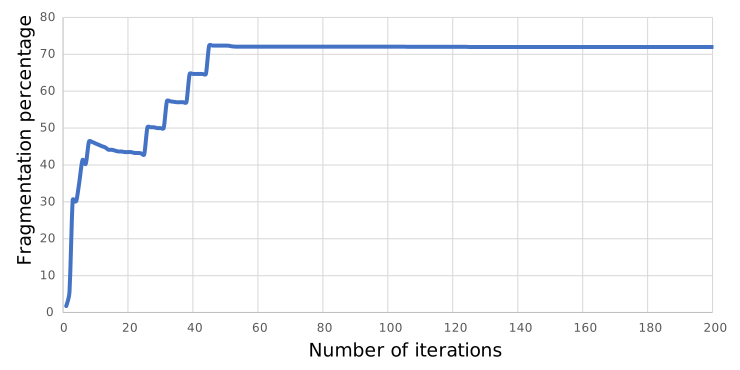
<p>I obtained the following graph with 20 strings whose length varied from 10 to 50
characters. The program ran on an Arduino UNO.</p>

<p><img src="/assets/images/2018/11/evolution-of-heap-fragmentation.svg" alt="A graph showing the evolution of heap fragmentation over time" /></p>

<p>As you see, when the program starts, the fragmentation is close to zero and then
increases irregularly until it stabilizes at about 70%.</p>

<p>I encourage you to tweak the settings to see the effect on the fragmentation.
In particular, you’ll see that when <code class="language-plaintext highlighter-rouge">SMALLEST_STRING</code> and <code class="language-plaintext highlighter-rouge">LARGEST_STRING</code> are
equals, i.e., if the <code class="language-plaintext highlighter-rouge">String</code>s are all of the same sizes, no fragmentation
occurs.</p>

<h2 id="why-is-heap-fragmentation-bad">Why is heap fragmentation bad?</h2>

<p>We saw how fragmentation increases, now let’s talk about the consequences of a
high fragmentation level.</p>

<h4 id="consequence-1-unreliable-program">Consequence 1: Unreliable program</h4>

<p>By definition, a high fragmentation level means you have a lot of free memory,
but you can only allocate small blocks. If your program needs a bigger block, it
will not get it and will stop working.</p>

<h4 id="consequence-2-degraded-performance">Consequence 2: Degraded performance</h4>

<p>A highly fragmented heap is slower because the memory allocator takes more time
to find the best hole, the so-called “best-fit.”</p>

<h2 id="if-its-so-huge-why-nobody-talks-about-it">If it’s so huge, why nobody talks about it?</h2>

<p>Heap fragmentation is a solved problem for most programmers, but not for us
Arduino programmers. Let’s see how other platforms handle the problem.</p>

<h4 id="solution-1-virtual-memory">Solution 1: Virtual memory</h4>

<p>The programs running on our computers use Virtual Memory. The value of the
pointer is not the physical location in the RAM; instead, the CPU translates
the address on the fly. This decoupling allows defragmenting the RAM without
moving anything but requires dedicated hardware that we do not have on our
microcontrollers.</p>

<h4 id="solution-2-optimized-allocators">Solution 2: Optimized allocators</h4>

<p>Either as part of the standard library or as a linked library, C++ programs
running on a computer embeds a heap allocator that is much more efficient than
what we have on our Arduinos.</p>

<p>The most common optimization is to gather small blocks into bins: one bin for
blocks of 4 bytes, one bin for 8 bytes, etc. Thanks to this technique the small
objects don’t contribute to and are not affected by the fragmentation.</p>

<h4 id="solution-3-short-string-optimization">Solution 3: Short string optimization</h4>

<p>Even if the C++ standard doesn’t mandate it, all implementations of
<code class="language-plaintext highlighter-rouge">std::string</code> support the “Small String Optimization,” or SSO. <code class="language-plaintext highlighter-rouge">std::string</code>
stores short strings locally and only uses the heap for long strings.</p>

<p>By reducing the number of small objects in the heap, the SSO reduces the
fragmentation. Unfortunately, the <code class="language-plaintext highlighter-rouge">String</code> class doesn’t perform SSO in Arduino.</p>

<h4 id="solution-4-heap-compacting">Solution 4: Heap compacting</h4>

<p>In languages with managed memory, the garbage collector moves the memory blocks
to squash the holes.</p>

<p>We cannot use this technique in C++ because moving a block would change its
address, so all pointers to this block would be invalid.</p>

<h4 id="solution-5-memory-pool">Solution 5: Memory pool</h4>

<p>Instead of allocating many small blocks, a program can allocate only one big
block and divide it as it needs. Within this block, the program is free to use
any allocation strategy.</p>

<p>For example, ArduinoJson implements this technique with <code class="language-plaintext highlighter-rouge">DynamicJsonBuffer</code>.</p>

<h2 id="so-what-can-i-do-to-reduce-heap-fragmentation">So what can I do to reduce heap fragmentation?</h2>

<p>None of these techniques applies to our Arduino programs, which means we have to
code in a way that reduces the fragmentation.</p>

<h4 id="strategy-1-avoid-heap-in-particular-avoid-string">Strategy 1: Avoid heap (in particular, avoid String)</h4>

<p>In many cases, we can avoid dynamic allocation. Instead of allocating objects in
the heap, we place them in the stack or in the globals. By design, these two
areas are not fragmented.</p>

<p>For example, we could replace all <code class="language-plaintext highlighter-rouge">String</code> objects with plain old <code class="language-plaintext highlighter-rouge">char[]</code>. Not
only we would reduce the fragmentation, but we would also create a smaller and
faster executable.</p>

<h4 id="strategy-2-short-object-lifetime">Strategy 2: Short object lifetime</h4>

<p>Short-lived objects have a small impact on the heap fragmentation. They rapidly
come and go, leaving the heap in the same state.</p>

<p>Long-lived objects, however, have a substantial impact on the heap
fragmentation. They book their room and stick here for a long time, leaving the
heap with an unmovable block in the middle.</p>

<p>So, if you still needed another reason to avoid global variables, there you have
it.</p>

<h4 id="strategy-3-constant-allocation">Strategy 3: Constant allocation</h4>

<p>As we saw, repeated allocations of the same size don’t cause fragmentation; so,
we could keep our objects in the heap but always use the same size.</p>

<p>For example, if we have a string that can have between 10 and 100 characters, we
could always reserve 100 characters:</p>

<div class="language-c++ highlighter-rouge"><div class="highlight"><pre class="highlight"><code><span class="n">myString</span><span class="p">.</span><span class="n">reserve</span><span class="p">(</span><span class="mi">100</span><span class="p">);</span>
</code></pre></div></div>

<p>As curious as it sounds, allocating more memory than strictly necessary allows
more efficient utilization of the RAM.</p>

<h2 id="conclusion">Conclusion</h2>

<p>This article was unusually long, I hoped you’ve gone through it.</p>

<p>Here is what you need to remember:</p>

<ol>
  <li>Fragmentation is an inefficient utilization of the RAM.</li>
  <li>Arduino programs, more than others, are affected by fragmentation.</li>
  <li>It’s our responsibility as programmers to fight against fragmentation.</li>
</ol>

<p>As usual, you’ll find the source code of the examples
<a href="https://github.com/bblanchon/cpp4arduino/tree/master/HeapFragmentation">on GitHub</a>.</p>

<p>I’ll see you soon with another article!</p>]]></content><author><name>{&quot;twitter&quot;=&gt;&quot;BenoitBlanchon&quot;}</name></author><summary type="html"><![CDATA[Heap fragmentation is a ubiquitous problem in Arduino programs, and yet it's mostly unknown. We'll see what fragmentation is, and how to fight against it.]]></summary><media:thumbnail xmlns:media="http://search.yahoo.com/mrss/" url="https://cpp4arduino.com/assets/images/2018/11/free-creates-a-hole.png" /><media:content medium="image" url="https://cpp4arduino.com/assets/images/2018/11/free-creates-a-hole.png" xmlns:media="http://search.yahoo.com/mrss/" /></entry><entry><title type="html">Why C++ programmers don’t use NULL?</title><link href="https://cpp4arduino.com/2018/10/26/why-cpp-programmers-dont-use-null.html" rel="alternate" type="text/html" title="Why C++ programmers don’t use NULL?" /><published>2018-10-26T00:00:00+02:00</published><updated>2018-10-26T00:00:00+02:00</updated><id>https://cpp4arduino.com/2018/10/26/why-cpp-programmers-dont-use-null</id><content type="html" xml:base="https://cpp4arduino.com/2018/10/26/why-cpp-programmers-dont-use-null.html"><![CDATA[<p>As most Arduino users, you probably learned the C language before C++. Of
course, you did! It’s the way everybody learns C++ today. While learning C, you
applied the good practice of using a <code class="language-plaintext highlighter-rouge">NULL</code> to designate an empty pointer.</p>

<p>What if I tell you that using <code class="language-plaintext highlighter-rouge">NULL</code> is considered as a code smell for
experienced C++ developers? And, what if I tell you that most C++ coding
standards now forbids using <code class="language-plaintext highlighter-rouge">NULL</code> entirely?</p>

<p>Read on if you want to know why!</p>

<h2 id="why-do-we-use-null-in-the-first-place">Why do we use NULL in the first place?</h2>

<p>Very often, we need a way to express that a variable contains no value. In a C
program, we do that by declaring a pointer and make it refer to a special
address that can never point to something real: zero. For instance, we could
declare an empty <code class="language-plaintext highlighter-rouge">color</code> string like that:</p>

<div class="language-c++ highlighter-rouge"><div class="highlight"><pre class="highlight"><code><span class="k">const</span> <span class="kt">char</span><span class="o">*</span> <span class="n">color</span> <span class="o">=</span> <span class="mi">0</span><span class="p">;</span>
</code></pre></div></div>

<p>But that wouldn’t be very clear, would it? That’s why C programmers insist on
using the symbol <code class="language-plaintext highlighter-rouge">NULL</code> to identify an empty pointer clearly. So, to follow best
practices, we should write:</p>

<div class="language-c++ highlighter-rouge"><div class="highlight"><pre class="highlight"><code><span class="k">const</span> <span class="kt">char</span><span class="o">*</span> <span class="n">color</span> <span class="o">=</span> <span class="nb">NULL</span><span class="p">;</span>
</code></pre></div></div>

<p>As long as we stay in the realm of the C language, everything is fine and you
can (and should) still use <code class="language-plaintext highlighter-rouge">NULL</code>.</p>

<h2 id="what-most-people-think-null-is">What most people think NULL is?</h2>

<p>I believe most people think that <code class="language-plaintext highlighter-rouge">NULL</code> is defined like that:</p>

<div class="language-c++ highlighter-rouge"><div class="highlight"><pre class="highlight"><code><span class="cp">#define NULL ((void*)0)
</span></code></pre></div></div>

<p>Indeed, it is the right definition for the C language. It works because the
language implicit converts <code class="language-plaintext highlighter-rouge">void*</code> to <code class="language-plaintext highlighter-rouge">T*</code> for any type <code class="language-plaintext highlighter-rouge">T</code>.</p>

<p>C++, however, with its strong-typing philosophy, doesn’t implicitly convert
from <code class="language-plaintext highlighter-rouge">void*</code> to <code class="language-plaintext highlighter-rouge">T*</code>.</p>

<p>Let’s try:</p>

<div class="language-c++ highlighter-rouge"><div class="highlight"><pre class="highlight"><code><span class="cp">#define NULL ((void*)0)
</span><span class="k">const</span> <span class="kt">char</span><span class="o">*</span> <span class="n">color</span> <span class="o">=</span> <span class="nb">NULL</span><span class="p">;</span>
</code></pre></div></div>

<p>A C compiler accepts these two lines without any problem, but a C++ compiler
returns the following error:</p>

<div class="language-text highlighter-rouge"><div class="highlight"><pre class="highlight"><code>error: invalid conversion from 'void*' to 'const char*' [-fpermissive]
</code></pre></div></div>

<p>To work around this error, we would have to cast <code class="language-plaintext highlighter-rouge">NULL</code> explicitly:</p>

<div class="language-c++ highlighter-rouge"><div class="highlight"><pre class="highlight"><code><span class="cp">#define NULL ((void*)0)
</span><span class="k">const</span> <span class="kt">char</span><span class="o">*</span> <span class="n">color</span> <span class="o">=</span> <span class="k">reinterpret_cast</span><span class="o">&lt;</span><span class="k">const</span> <span class="kt">char</span><span class="o">*&gt;</span><span class="p">(</span><span class="nb">NULL</span><span class="p">);</span>
</code></pre></div></div>

<p>Ugly, isn’t it?</p>

<h2 id="what-null-really-is">What NULL really is?</h2>

<p>We saw that the definition of <code class="language-plaintext highlighter-rouge">NULL</code> in C++ could not be the same as the
definition in C. So, what is it?</p>

<p>Well, it is very likely to be defined like that:</p>

<div class="language-c++ highlighter-rouge"><div class="highlight"><pre class="highlight"><code><span class="cp">#define NULL 0
</span></code></pre></div></div>

<p>I know, it’s quite disappointing… The C++ standard allows other definitions
but, from my experience, it’s often defined to <code class="language-plaintext highlighter-rouge">0</code>.</p>

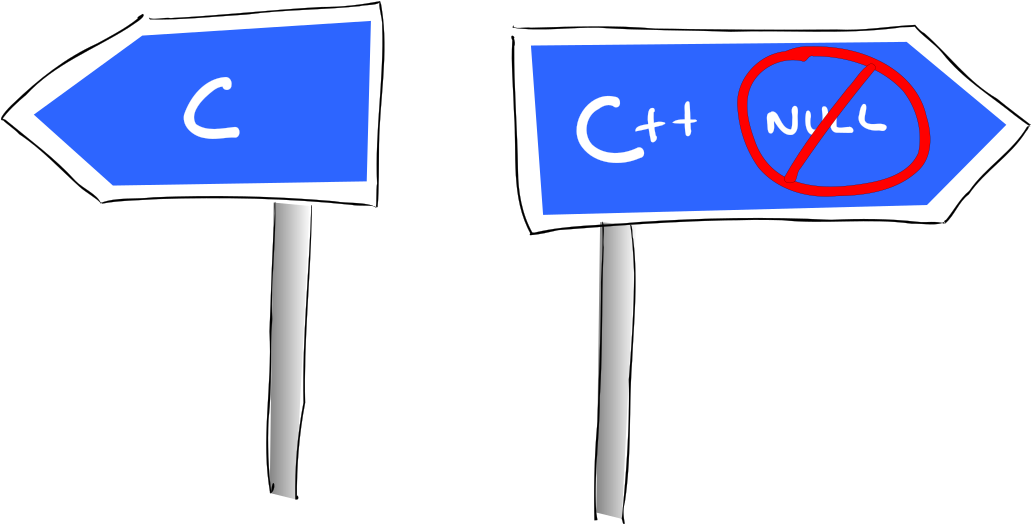
<p><img src="/assets/images/2018/10/cpp-no-null.svg" alt="Two road signs: C and C++. NULL is forbidden on the C++ road." /></p>

<h2 id="why-does-that-make-a-difference">Why does that make a difference?</h2>

<p>OK, <code class="language-plaintext highlighter-rouge">NULL</code> is not a <code class="language-plaintext highlighter-rouge">void*</code> but an <code class="language-plaintext highlighter-rouge">int</code>, so what? No big deal!</p>

<p>Well, maybe not a big deal, but still very annoying in certain situations.</p>

<p>For example:</p>

<div class="language-c++ highlighter-rouge"><div class="highlight"><pre class="highlight"><code><span class="k">const</span> <span class="kt">char</span> <span class="o">*</span><span class="n">color</span> <span class="o">=</span> <span class="nb">NULL</span><span class="p">;</span>
<span class="n">String</span> <span class="nf">colorStr1</span><span class="p">(</span><span class="n">color</span><span class="p">);</span>
<span class="n">String</span> <span class="nf">colorStr2</span><span class="p">(</span><span class="nb">NULL</span><span class="p">);</span>
</code></pre></div></div>

<p>At first sight, <code class="language-plaintext highlighter-rouge">colorStr1</code> and <code class="language-plaintext highlighter-rouge">colorStr2</code> look identical. So, if we compare
them, they should be equal, right?</p>

<div class="language-c++ highlighter-rouge"><div class="highlight"><pre class="highlight"><code><span class="k">if</span> <span class="p">(</span><span class="n">colorStr1</span><span class="o">==</span> <span class="n">colorStr2</span><span class="p">)</span> <span class="p">{</span>
  <span class="n">Serial</span><span class="p">.</span><span class="n">println</span><span class="p">(</span><span class="s">"colorStr1 == colorStr2"</span><span class="p">);</span>
<span class="p">}</span> <span class="k">else</span> <span class="p">{</span>
  <span class="n">Serial</span><span class="p">.</span><span class="n">println</span><span class="p">(</span><span class="s">"colorStr1 != colorStr2"</span><span class="p">);</span>
<span class="p">}</span>
</code></pre></div></div>

<p>If you run this program, it displays <code class="language-plaintext highlighter-rouge">colorStr1 != colorStr2</code>, proving that the
<code class="language-plaintext highlighter-rouge">String</code>s differ.</p>

<p>Let’s print them:</p>

<div class="language-c++ highlighter-rouge"><div class="highlight"><pre class="highlight"><code><span class="n">Serial</span><span class="p">.</span><span class="n">print</span><span class="p">(</span><span class="s">"colorStr1 = "</span><span class="p">);</span>
<span class="n">Serial</span><span class="p">.</span><span class="n">println</span><span class="p">(</span><span class="n">colorStr1</span><span class="p">);</span>
<span class="n">Serial</span><span class="p">.</span><span class="n">print</span><span class="p">(</span><span class="s">"colorStr2 = "</span><span class="p">);</span>
<span class="n">Serial</span><span class="p">.</span><span class="n">println</span><span class="p">(</span><span class="n">colorStr2</span><span class="p">);</span>
</code></pre></div></div>

<p>These four line produces the following output:</p>

<div class="language-text highlighter-rouge"><div class="highlight"><pre class="highlight"><code>colorStr1 =
colorStr2 = 0
</code></pre></div></div>

<p>Strange, isn’t it?</p>

<h3 id="problem-1-null-messes-with-functions-overloading">Problem 1: NULL messes with functions overloading</h3>

<p>We saw that the definition of <code class="language-plaintext highlighter-rouge">NULL</code> exposes an inconsistency in the <code class="language-plaintext highlighter-rouge">String</code> class.
To understand the reason, let’s look at a simpler version of the same problem.
We declare two functions, like that:</p>

<div class="language-c++ highlighter-rouge"><div class="highlight"><pre class="highlight"><code><span class="kt">void</span> <span class="nf">f</span><span class="p">(</span><span class="k">const</span> <span class="kt">char</span><span class="o">*</span><span class="p">);</span>
<span class="kt">void</span> <span class="nf">f</span><span class="p">(</span><span class="kt">int</span><span class="p">);</span>
</code></pre></div></div>

<p>Since these functions have the same name, they are overloads, meaning that the
compiler calls one or the other depending on the type of the argument. Remember
that function overloading is available in C++, but not in C.</p>

<p>So, guess which overload is chosen when we call:</p>

<div class="language-c++ highlighter-rouge"><div class="highlight"><pre class="highlight"><code><span class="n">f</span><span class="p">(</span><span class="nb">NULL</span><span class="p">);</span>
</code></pre></div></div>

<p>If you’re like me, your first deduction was that this line should call the
overload taking a char-pointer. However, after what we saw earlier, you should
understand why it calls the other overload. Indeed, as far as the compiler is
concerned, it’s identical to calling <code class="language-plaintext highlighter-rouge">f()</code> like that:</p>

<div class="language-c++ highlighter-rouge"><div class="highlight"><pre class="highlight"><code><span class="n">f</span><span class="p">(</span><span class="mi">0</span><span class="p">);</span>
</code></pre></div></div>

<p>How is that related to the <code class="language-plaintext highlighter-rouge">String</code> problem? Simple! By passing <code class="language-plaintext highlighter-rouge">NULL</code> to the
constructor, we just called the wrong overload, the one that takes an integer
and converts it to a string.</p>

<h3 id="problem-2-null-messes-with-template-type-deduction">Problem 2: NULL messes with template type deduction</h3>

<p>We saw that the strange definition of <code class="language-plaintext highlighter-rouge">NULL</code> pushes the compiler to select the
wrong overload but is it the only problem? Unfortunately no, it also confuses
the template type deduction. Imaging we declare this template function:</p>

<div class="language-c++ highlighter-rouge"><div class="highlight"><pre class="highlight"><code><span class="k">template</span><span class="o">&lt;</span><span class="k">typename</span> <span class="nc">T</span><span class="p">&gt;</span>
<span class="kt">void</span> <span class="nf">printValue</span><span class="p">(</span><span class="n">T</span> <span class="n">value</span><span class="p">);</span>
</code></pre></div></div>

<p>Then, we specialize it for integer and pointer:</p>

<div class="language-c++ highlighter-rouge"><div class="highlight"><pre class="highlight"><code><span class="k">template</span> <span class="o">&lt;</span><span class="p">&gt;</span>
<span class="kt">void</span> <span class="n">printValue</span><span class="o">&lt;</span><span class="kt">int</span><span class="o">&gt;</span><span class="p">(</span><span class="kt">int</span> <span class="n">value</span><span class="p">)</span> <span class="p">{</span>
  <span class="n">Serial</span><span class="p">.</span><span class="n">print</span><span class="p">(</span><span class="s">"Integer: "</span><span class="p">);</span>
  <span class="n">Serial</span><span class="p">.</span><span class="n">println</span><span class="p">(</span><span class="n">value</span><span class="p">,</span> <span class="n">DEC</span><span class="p">);</span>
<span class="p">}</span>

<span class="k">template</span> <span class="o">&lt;</span><span class="p">&gt;</span>
<span class="kt">void</span> <span class="n">printValue</span><span class="o">&lt;</span><span class="kt">void</span> <span class="o">*&gt;</span><span class="p">(</span><span class="kt">void</span> <span class="o">*</span><span class="n">value</span><span class="p">)</span> <span class="p">{</span>
  <span class="n">Serial</span><span class="p">.</span><span class="n">print</span><span class="p">(</span><span class="s">"Pointer: 0x"</span><span class="p">);</span>
  <span class="n">Serial</span><span class="p">.</span><span class="n">println</span><span class="p">((</span><span class="kt">intptr_t</span><span class="p">)</span><span class="n">value</span><span class="p">,</span> <span class="n">HEX</span><span class="p">);</span>
<span class="p">}</span>
</code></pre></div></div>

<p>Now, if we call <code class="language-plaintext highlighter-rouge">printValue(NULL)</code>, it will print:</p>

<div class="language-text highlighter-rouge"><div class="highlight"><pre class="highlight"><code>Integer: 0
</code></pre></div></div>

<p>I know there are better ways to solve this problem; I show you this example
because it illustrates the problem with <code class="language-plaintext highlighter-rouge">NULL</code>. With this program, we see that
the compiler deduces the template type to be an integer, while we imagined it
would be some pointer type.</p>

<p>Let’s see how this type deduction thing can affect your program on the real
life. Imaging you use <a href="https://arduinojson.org">ArduinoJson 5</a>, and you write
something like that:</p>

<div class="language-c++ highlighter-rouge"><div class="highlight"><pre class="highlight"><code><span class="n">DynamicJsonBuffer</span> <span class="n">jb</span><span class="p">;</span>
<span class="n">JsonObject</span><span class="o">&amp;</span> <span class="n">obj</span><span class="o">=</span> <span class="n">jb</span><span class="p">.</span><span class="n">parseObject</span><span class="p">(</span><span class="s">"{</span><span class="se">\"</span><span class="s">id</span><span class="se">\"</span><span class="s">:0}"</span><span class="p">);</span>
<span class="k">if</span> <span class="p">(</span><span class="n">obj</span><span class="p">[</span><span class="s">"id"</span><span class="p">]</span> <span class="o">==</span> <span class="nb">NULL</span><span class="p">)</span> <span class="p">{</span>
  <span class="n">Serial</span><span class="p">.</span><span class="n">println</span><span class="p">(</span><span class="s">"ERROR: id is missing"</span><span class="p">);</span>
<span class="p">}</span>
</code></pre></div></div>

<p>This program displays an error, even if the key <code class="language-plaintext highlighter-rouge">id</code> is present in the object,
because the compiler believes you wrote:</p>

<div class="language-c++ highlighter-rouge"><div class="highlight"><pre class="highlight"><code><span class="k">if</span> <span class="p">(</span><span class="n">obj</span><span class="p">[</span><span class="s">"id"</span><span class="p">]</span> <span class="o">==</span> <span class="mi">0</span><span class="p">)</span> <span class="p">{</span>
</code></pre></div></div>

<p>So, you see, this template type deduction can have real implications.</p>

<p>By the way, if you want to fix this program, see
<a href="https://arduinojson.org/v5/api/jsonobject/containskey/">JsonObject::containsKey()</a>.</p>

<h2 id="the-solution">The solution</h2>

<p>I told you that C++ programmers banned <code class="language-plaintext highlighter-rouge">NULL</code> from their code-base, but what do
they use instead?</p>

<p>Instead of <code class="language-plaintext highlighter-rouge">NULL</code>, they use <code class="language-plaintext highlighter-rouge">nullptr</code>, a new keyword introduced in C++11.</p>

<ul>
  <li>Like <code class="language-plaintext highlighter-rouge">NULL</code>, <code class="language-plaintext highlighter-rouge">nullptr</code> implicitly converts to <code class="language-plaintext highlighter-rouge">T*</code> for any type <code class="language-plaintext highlighter-rouge">T</code>.</li>
  <li>Unlike <code class="language-plaintext highlighter-rouge">NULL</code>, <code class="language-plaintext highlighter-rouge">nullptr</code> is not an integer so it cannot call the wrong
overload.</li>
  <li>Unlike <code class="language-plaintext highlighter-rouge">NULL</code>, <code class="language-plaintext highlighter-rouge">nullptr</code> has its own type, <code class="language-plaintext highlighter-rouge">nullptr_t</code>, so the compiler makes
correct type deductions.</li>
</ul>

<p>Are there any drawbacks to using <code class="language-plaintext highlighter-rouge">nullptr</code> instead of <code class="language-plaintext highlighter-rouge">NULL</code>? No, unless you
target old compilers that don’t support C++11, which is very unlikely.</p>

<h2 id="mitigations">Mitigations</h2>

<p>Before wrapping up, I’d like to clarify something I skipped to simplify this
article.</p>

<p>The C++ standard committee knows there is a lot of existing code using <code class="language-plaintext highlighter-rouge">NULL</code>
that would become safer if it was using <code class="language-plaintext highlighter-rouge">nullptr</code> instead. So, in the C++11
standard, they allowed the definition of <code class="language-plaintext highlighter-rouge">NULL</code> to be:</p>

<div class="language-c++ highlighter-rouge"><div class="highlight"><pre class="highlight"><code><span class="c1">// either</span>
<span class="cp">#define NULL 0
</span><span class="c1">// or</span>
<span class="cp">#define NULL nullptr
</span><span class="c1">// both are legal in C++11</span>
</code></pre></div></div>

<p>From my experience, the standard library defines <code class="language-plaintext highlighter-rouge">NULL</code> as <code class="language-plaintext highlighter-rouge">0</code>, not as
<code class="language-plaintext highlighter-rouge">nullptr</code>. However, what the C++11 standard allows us it to replace it in our
code-base to make our old code safer with a single line in the right header.</p>

<p>Compiler writers are also well aware of the problems with <code class="language-plaintext highlighter-rouge">NULL</code>, so they
implemented a special case allowing them to issue a warning when appropriate.
For example, when we call <code class="language-plaintext highlighter-rouge">f(NULL)</code> as we did earlier, the compiler produces
the following warning:</p>

<div class="language-text highlighter-rouge"><div class="highlight"><pre class="highlight"><code>warning: passing NULL to non-pointer argument 1 of 'void f(int, int)' [-Wconversion-null]
</code></pre></div></div>

<p>You always look at the warnings, right?</p>

<h2 id="conclusion">Conclusion</h2>

<p>I could have written this article with just one single line:</p>

<blockquote>
  <p>Don’t use <code class="language-plaintext highlighter-rouge">NULL</code>, use <code class="language-plaintext highlighter-rouge">nullptr</code> instead</p>
</blockquote>

<p>That’s not the way I work. I don’t just tell people what to do; I explain why
they should do it. Understanding the rationale behind the language features is
what will make you a <strong>great C++ developer</strong>, so stay tuned to read more
articles like this one.</p>

<p>By the way, if you want to practice at home, download the samples for this
article on <a href="https://github.com/bblanchon/cpp4arduino/tree/master/Null">github.com/bblanchon/cpp4arduino</a>.</p>

<p>See you soon!</p>]]></content><author><name>{&quot;twitter&quot;=&gt;&quot;BenoitBlanchon&quot;}</name></author><summary type="html"><![CDATA[We often see NULL in Arduino programs. What if I tell you that using NULL is considered as a code smell for experienced C++ developers?]]></summary></entry><entry><title type="html">What is string interning?</title><link href="https://cpp4arduino.com/2018/10/23/what-is-string-interning.html" rel="alternate" type="text/html" title="What is string interning?" /><published>2018-10-23T00:00:00+02:00</published><updated>2018-10-23T00:00:00+02:00</updated><id>https://cpp4arduino.com/2018/10/23/what-is-string-interning</id><content type="html" xml:base="https://cpp4arduino.com/2018/10/23/what-is-string-interning.html"><![CDATA[<p>“String interning” (sometimes called “string pooling”) is an optimization that
consists of storing only one copy of a string, no matter how many times the
program references it. While it’s undoubtedly of great benefit to our programs,
we’ll see that it also comes with a few pitfalls.</p>

<h2 id="why-this-optimization">Why this optimization?</h2>

<p>Have you ever written the exact same string several times in the same program? I know it happens to me all the time. For example, I could write:</p>

<div class="language-c++ highlighter-rouge"><div class="highlight"><pre class="highlight"><code><span class="n">color</span> <span class="o">=</span> <span class="s">"black"</span><span class="p">;</span>
</code></pre></div></div>

<p>and, later in the code, I would write:</p>

<div class="language-c++ highlighter-rouge"><div class="highlight"><pre class="highlight"><code><span class="n">strcmp</span><span class="p">(</span><span class="n">color</span><span class="p">,</span> <span class="s">"black"</span><span class="p">);</span>
</code></pre></div></div>

<p>As you can see, I wrote the string literal “black” twice, does this mean that
the program contains two copies of “black”? More importantly, does it mean that
the program loads two copies in the RAM?</p>

<p>Fortunately, the answer is no to the two questions. Thanks to the string
interning optimization, <strong>only one copy of each</strong> literal is stored in the program
(i.e., in the Flash memory), and so only one is loaded in the RAM.</p>

<h2 id="demonstration">Demonstration</h2>

<p>Demonstrating that string interning stores only one copy of two identical string
literals is straightforward: we just need to compare the pointers. If the
pointers refer to the same address, it means that there is only one copy in the
RAM.</p>

<p>Here is a simple program that you can run on your Arduino:</p>

<div class="language-c++ highlighter-rouge"><div class="highlight"><pre class="highlight"><code><span class="k">const</span> <span class="kt">char</span><span class="o">*</span> <span class="n">s1</span> <span class="o">=</span> <span class="s">"black"</span><span class="p">;</span>
<span class="k">const</span> <span class="kt">char</span><span class="o">*</span> <span class="n">s2</span> <span class="o">=</span> <span class="s">"black"</span><span class="p">;</span>
<span class="n">Serial</span><span class="p">.</span><span class="n">println</span><span class="p">((</span><span class="kt">intptr_t</span><span class="p">)</span><span class="n">s1</span><span class="p">);</span>
<span class="n">Serial</span><span class="p">.</span><span class="n">println</span><span class="p">((</span><span class="kt">intptr_t</span><span class="p">)</span><span class="n">s2</span><span class="p">);</span>
</code></pre></div></div>

<p>As you can see, I cast the pointer to <code class="language-plaintext highlighter-rouge">intptr_t</code> to display its value, i.e. the
address it points to. <code class="language-plaintext highlighter-rouge">intptr_t</code> is an integer whose size matches the size of a
pointer. On most machines, <code class="language-plaintext highlighter-rouge">intptr_t</code> is identical to <code class="language-plaintext highlighter-rouge">int</code>.</p>

<p>On my Arduino UNO, the program above displays:</p>

<div class="language-text highlighter-rouge"><div class="highlight"><pre class="highlight"><code>s1 = 309
s2 = 309
</code></pre></div></div>

<p>As you can see, <strong>the two values are identical</strong>, proving that the optimization
worked.</p>

<p><img src="/assets/images/2018/10/string-interning.svg" alt="The two pointers refering to the same string in the RAM" /></p>

<h2 id="an-optimization-performed-by-the-compiler">An optimization performed by the compiler</h2>

<p>In C++, the compiler performs the string interning, so the deduplication <strong>can
only happen at compile time</strong>. It means that if your program assembles to
identical strings in RAM, there would be two copies. In other words, the
optimization works only for the strings known at compile time: the string
literals.</p>

<p>In other languages, like C# or Java, the string interning also happens at
runtime, because the .NET Runtime or the Java Virtual Machine implements this
optimization. In C++, we don’t have a runtime environment that could perform
this optimization, so we only have it at compile time.</p>

<p>If for some odd reason, you want to disable this optimization, GCC (the compiler
behind Arduino) supports the flag <code class="language-plaintext highlighter-rouge">-fno-merge-constants</code>. By the way, the same
optimization deduplicates floating point literals.</p>

<h2 id="defeating-the-optimization">Defeating the optimization</h2>

<p>Unfortunately, this optimization is <strong>very fragile</strong>: there are many ways to break
it. We saw that it works fine with <code class="language-plaintext highlighter-rouge">const char*</code>:</p>

<div class="language-c++ highlighter-rouge"><div class="highlight"><pre class="highlight"><code><span class="c1">// Number of copies: 1 in Flash, 1 in RAM</span>
<span class="k">const</span> <span class="kt">char</span><span class="o">*</span> <span class="n">s1</span> <span class="o">=</span> <span class="s">"black"</span><span class="p">;</span>
<span class="k">const</span> <span class="kt">char</span><span class="o">*</span> <span class="n">s2</span> <span class="o">=</span> <span class="s">"black"</span><span class="p">;</span>
</code></pre></div></div>

<p>If instead, we change the type to <code class="language-plaintext highlighter-rouge">char[]</code>, the program makes a copy of the
literal when it creates the variables:</p>

<div class="language-c++ highlighter-rouge"><div class="highlight"><pre class="highlight"><code><span class="c1">// Number of copies: 1 in Flash, 3 in RAM</span>
<span class="k">const</span> <span class="kt">char</span> <span class="n">s1</span><span class="p">[]</span> <span class="o">=</span> <span class="s">"black"</span><span class="p">;</span>
<span class="k">const</span> <span class="kt">char</span> <span class="n">s2</span><span class="p">[]</span> <span class="o">=</span> <span class="s">"black"</span><span class="p">;</span>
</code></pre></div></div>

<p>Similarly, if we change the type to <code class="language-plaintext highlighter-rouge">String</code>, the constructor makes a copy of
the string:</p>

<div class="language-c++ highlighter-rouge"><div class="highlight"><pre class="highlight"><code><span class="c1">// Number of copies: 1 in Flash, 3 in RAM</span>
<span class="n">String</span> <span class="n">s1</span> <span class="o">=</span> <span class="s">"black"</span><span class="p">;</span>
<span class="n">String</span> <span class="n">s2</span> <span class="o">=</span> <span class="s">"black"</span><span class="p">;</span>
</code></pre></div></div>

<h2 id="flash-string">Flash String</h2>

<p>Do you think the compiler deduplicates Flash strings (also known as Progmem
strings) in the same way? <strong>Unfortunately, no</strong>.</p>

<p>Again, it’s very easy to verify, we just need to reuse the same snippet,
changing only the types of the variables:</p>

<div class="language-c++ highlighter-rouge"><div class="highlight"><pre class="highlight"><code><span class="c1">// Number of copies: 2 in Flash, 0 in RAM</span>
<span class="k">const</span> <span class="kt">char</span> <span class="n">s1</span><span class="p">[]</span> <span class="n">PROGMEM</span> <span class="o">=</span> <span class="s">"black"</span><span class="p">;</span>
<span class="k">const</span> <span class="kt">char</span> <span class="n">s2</span><span class="p">[]</span> <span class="n">PROGMEM</span> <span class="o">=</span> <span class="s">"black"</span><span class="p">;</span>
<span class="n">Serial</span><span class="p">.</span><span class="n">println</span><span class="p">((</span><span class="kt">intptr_t</span><span class="p">)</span><span class="n">s1</span><span class="p">);</span>
<span class="n">Serial</span><span class="p">.</span><span class="n">println</span><span class="p">((</span><span class="kt">intptr_t</span><span class="p">)</span><span class="n">s2</span><span class="p">);</span>
</code></pre></div></div>

<p>When I run this program on my Arduino UNO, it displays:</p>

<div class="language-text highlighter-rouge"><div class="highlight"><pre class="highlight"><code>s1 = 122
s2 = 116
</code></pre></div></div>

<p>As you can see, the addresses are different, proving that the optimization
didn’t work.</p>

<p>Unlike our previous examples, these addresses refer to the Flash memory, not to
the RAM. Indeed, the attribute <code class="language-plaintext highlighter-rouge">PROGMEM</code> instructs the compiler not to load the
string in the RAM but, instead, to point to the location in the “program
memory.”</p>

<p>You could be tempted to keep the <code class="language-plaintext highlighter-rouge">PROGMEM</code> attribute and change the type to
<code class="language-plaintext highlighter-rouge">char*</code> instead of <code class="language-plaintext highlighter-rouge">char[]</code>, but if you do that, the compiler simply ignores the
attribute:</p>

<div class="language-c++ highlighter-rouge"><div class="highlight"><pre class="highlight"><code><span class="c1">// WRONG: doesn't do what you think!</span>
<span class="c1">// Number of copies: 1 in Flash, 2 in RAM</span>
<span class="k">const</span> <span class="kt">char</span> <span class="n">s1</span><span class="o">*</span> <span class="k">const</span> <span class="n">PROGMEM</span> <span class="o">=</span> <span class="s">"black"</span><span class="p">;</span>
<span class="k">const</span> <span class="kt">char</span> <span class="n">s2</span><span class="o">*</span> <span class="k">const</span> <span class="n">PROGMEM</span> <span class="o">=</span> <span class="s">"black"</span><span class="p">;</span>
</code></pre></div></div>

<p>Now, what about the macro <code class="language-plaintext highlighter-rouge">F()</code> that we see in all Arduino examples, it’s good,
right? I’m afraid it’s <strong>not good at all</strong>… I would even say that it’s worse
because it gives you a false sense of rightfulness. Indeed, the syntax is so
close to the classic string literal that we believe it behaves the same way.</p>

<p>Again, it’s very easy to demonstrate:</p>

<div class="language-c++ highlighter-rouge"><div class="highlight"><pre class="highlight"><code><span class="c1">// Number of copies: 2 in Flash, 0 in RAM</span>
<span class="k">const</span> <span class="n">__FlashStringHelper</span><span class="o">*</span> <span class="n">s1</span> <span class="o">=</span> <span class="n">F</span><span class="p">(</span><span class="s">"black"</span><span class="p">);</span>
<span class="k">const</span> <span class="n">__FlashStringHelper</span><span class="o">*</span> <span class="n">s2</span> <span class="o">=</span> <span class="n">F</span><span class="p">(</span><span class="s">"black"</span><span class="p">);</span>
</code></pre></div></div>

<p>Sadly, many people believe they are following best practices by calling <code class="language-plaintext highlighter-rouge">F()</code>
everywhere, but in reality, they are bloating their programs with useless copies
of the same string.</p>

<p>This limitation is one of the many reasons I avoid Flash strings in my programs;
I only use them for long, unique, and rarely used strings, like log messages.</p>

<h2 id="comparing-strings">Comparing strings</h2>

<p>Now that we’ve seen the benefits of string interning and all the ways we can
defeat the optimization, let’s talk about one major pitfall: the comparison of
strings with the operator <code class="language-plaintext highlighter-rouge">==</code>.</p>

<p>If you use the operator <code class="language-plaintext highlighter-rouge">==</code> on pointer types, it compares the addresses, not
the content. As we saw, two identical strings can have the same address when
string interning works, or different addresses when string interning doesn’t
apply.</p>

<p>Let see an example:</p>

<div class="language-c++ highlighter-rouge"><div class="highlight"><pre class="highlight"><code><span class="k">const</span> <span class="kt">char</span><span class="o">*</span> <span class="n">color</span> <span class="o">=</span> <span class="s">"black"</span><span class="p">;</span>
<span class="k">if</span> <span class="p">(</span><span class="n">color</span> <span class="o">==</span> <span class="s">"black"</span><span class="p">)</span> <span class="p">{</span> <span class="c1">// true because of string interning</span>
  <span class="c1">// ...</span>
<span class="p">}</span>
</code></pre></div></div>

<p>All is well, but it stops working as soon as one of the strings is not included
in the optimization, like in the example:</p>

<div class="language-c++ highlighter-rouge"><div class="highlight"><pre class="highlight"><code><span class="k">const</span> <span class="kt">char</span> <span class="n">color</span><span class="p">[]</span> <span class="o">=</span> <span class="s">"black"</span><span class="p">;</span>
<span class="k">if</span> <span class="p">(</span><span class="n">color</span>  <span class="o">==</span> <span class="s">"black"</span><span class="p">)</span> <span class="p">{</span> <span class="c1">// false because color holds a copy</span>
  <span class="c1">// ...</span>
<span class="p">}</span>
</code></pre></div></div>

<p>That is why it is crucial never to use the operator <code class="language-plaintext highlighter-rouge">==</code> to compare strings in
<code class="language-plaintext highlighter-rouge">char*</code>. Instead, we must use <code class="language-plaintext highlighter-rouge">strcmp()</code>, a function from the C standard library
that compares characters one by one and returns <code class="language-plaintext highlighter-rouge">0</code> if the two strings match
(it also returns <code class="language-plaintext highlighter-rouge">-1</code> or <code class="language-plaintext highlighter-rouge">+1</code> depending on the lexicographical order, but it’s
not our concern here).</p>

<div class="language-c++ highlighter-rouge"><div class="highlight"><pre class="highlight"><code><span class="k">const</span> <span class="kt">char</span> <span class="n">color</span><span class="p">[]</span> <span class="o">=</span> <span class="s">"black"</span><span class="p">;</span>
<span class="k">if</span> <span class="p">(</span><span class="n">strcmp</span><span class="p">(</span><span class="n">color</span><span class="p">,</span> <span class="s">"black"</span><span class="p">)</span> <span class="o">==</span> <span class="mi">0</span><span class="p">)</span> <span class="p">{</span> <span class="c1">// true because it compare each character</span>
  <span class="c1">// ...</span>
<span class="p">}</span>
</code></pre></div></div>

<p>Admittedly, this program is less readable, less expressive, and more
error-prone, but that’s our legacy from the C language.</p>

<p>An alternative is to use the String class. Indeed, this class overloads the
operator <code class="language-plaintext highlighter-rouge">==</code>, so you can safely compare Strings:</p>

<div class="language-c++ highlighter-rouge"><div class="highlight"><pre class="highlight"><code><span class="n">String</span> <span class="n">color</span> <span class="o">=</span> <span class="s">"black"</span><span class="p">;</span>
<span class="k">if</span> <span class="p">(</span><span class="n">color</span>  <span class="o">==</span> <span class="s">"black"</span><span class="p">)</span> <span class="p">{</span> <span class="c1">// true because it calls String::operator==()</span>
  <span class="c1">// ..</span>
<span class="p">}</span>
</code></pre></div></div>

<p>However, that’s not a reason to use this class everywhere, because it comes with
its own baggage, namely heap allocation and string duplication, but that’s a
topic for another article.</p>

<h2 id="conclusion">Conclusion</h2>

<p>String interning is a powerful optimization, but it can be easily defeated. In
particular, <strong>beware of the macro <code class="language-plaintext highlighter-rouge">F()</code></strong> that pretends to work like a string
literal but bloats your program with multiple copies of the same string.</p>

<p>I thought you might want to run the same tests on your microcontroller, so I
uploaded to GitHub a sample program that shows the addresses of strings of
various types. You can find it at <a href="https://github.com/bblanchon/cpp4arduino/tree/master/StringInterning">github.com/bblanchon/cpp4arduino</a>.</p>

<p>That’s all I have to say about string interning. I hope you learned something
today; if so, share with your friends. If you want more articles like this, you
can <a href="#" class="open-subscribe-popup">subscribe to the mailing list</a>. See you soon!</p>]]></content><author><name>{&quot;twitter&quot;=&gt;&quot;BenoitBlanchon&quot;}</name></author><summary type="html"><![CDATA[\"String interning\" (or \"string pooling\") is an optimization to reduce RAM usage. After explaining how it works, we'll see that it comes with a few pitfalls.]]></summary><media:thumbnail xmlns:media="http://search.yahoo.com/mrss/" url="https://cpp4arduino.com/assets/images/2018/10/string-interning.png" /><media:content medium="image" url="https://cpp4arduino.com/assets/images/2018/10/string-interning.png" xmlns:media="http://search.yahoo.com/mrss/" /></entry></feed>